---
title: Customizing layout options (People Directory)
description: Learn how to customize the People Directory layout, including card and list views, actions, and placeholders for a clean, user-friendly directory.
---
[Skip to content](https://support.accelerator365.com/en/people-directory-layout-options#main-content)
[.png?width=100&height=47&name=Accelerator%20365%20Logo%20(Colour%20+%20No%20Text).png)](https://support.accelerator365.com/?hsLang=en)
- [Home](https://support.accelerator365.com/en)
- [Getting started guides](https://support.accelerator365.com/en/getting-started)
- Product support
Show submenu for Product support
- [Apps](https://support.accelerator365.com/en/apps)
- [Solutions](https://support.accelerator365.com/en/solutions)
- [Look Book support](https://support.accelerator365.com/en/look-book)
- [Pricing support](https://support.accelerator365.com/en/pricing)
- [Technical support](https://support.accelerator365.com/en/technical)
- [Accelerator 365 website](https://accelerator365.com/)
Open main navigation
Close main navigation
- [Home](https://support.accelerator365.com/en)
- [Getting started guides](https://support.accelerator365.com/en/getting-started)
- Product support
Show submenu for Product support
- [Apps](https://support.accelerator365.com/en/apps)
- [Solutions](https://support.accelerator365.com/en/solutions)
- [Look Book support](https://support.accelerator365.com/en/look-book)
- [Pricing support](https://support.accelerator365.com/en/pricing)
- [Technical support](https://support.accelerator365.com/en/technical)
- [Accelerator 365 website](https://accelerator365.com/)
- [Contact us](https://accelerator365.com/pages/contact)
[Contact us](https://accelerator365.com/pages/contact)
Hello, how can we help you?
- There are no suggestions because the search field is empty.
1. [Accelerator 365 Knowledge Base](https://support.accelerator365.com/en?hsLang=en)
2. [Apps](https://support.accelerator365.com/en/apps?hsLang=en)
3. [People Directory](https://support.accelerator365.com/en/apps?hsLang=en#people-directory)
# Customizing layout options (People Directory)
## How to personalize the look and feel of the People Directory app by Accelerator 365
The People Directory app lets you display colleagues in a way that works best for your organization. Customize card and list views, actions, and placeholders to create a clean, intuitive directory that helps your team find and connect with colleagues quickly.
### Jump to
- [Configuring the layout controls](https://support.accelerator365.com/en/people-directory-layout-options#layout-controls)
- [Configure cards and columns](https://support.accelerator365.com/en/people-directory-layout-options#configure-cards-and-columns)
- [Configure actions](https://support.accelerator365.com/en/people-directory-layout-options#configure-actions)
- [Manage placeholders](https://support.accelerator365.com/en/people-directory-layout-options#manage-placeholders)
- [Related articles](https://support.accelerator365.com/en/people-directory-layout-options#related-articles)
---
### Configuring the layout controls
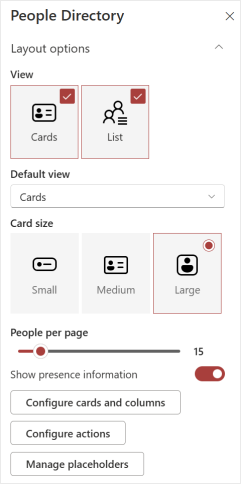
You can customize how the People Directory is displayed, from choosing card or list views to controlling pagination and presence, so users can browse profiles in a way that feels natural.
1. Enter **edit mode** on the app.
2. In the **property pane**, go to the **Layout** section.
3. Use the **view selector** to choose between **Card**, **List**, or **both**.
4. If both views are enabled, select the **default view** from the drop-down menu.
5. If the **Card view** is enabled, select a **card size**: Small, Medium, or Large.
- **Small** - a compact view showing the profile image, display name, and one attribute. Great for a clean, simple display.
- **Medium** - includes all Small card information plus two additional attributes. Ideal for showing more context without taking up too much space.
- **Large** - shows all Medium card information plus two more attributes. Perfect when you want to highlight full profile details.
6. Set the number of **People per page** to control how many contacts users see at once. The default is 15 people, but can scale from 1 to 100.
7. Toggle **Show presence information** to display Microsoft 365 presence icons, so users can quickly see who’s online.
---
### Configure cards and columns
You can decide exactly which profile attributes appear on all cards or columns, giving users the details they need.
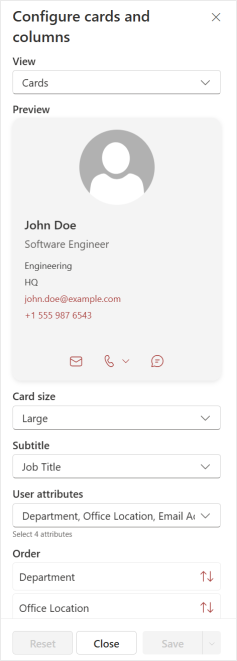
1. In the property pane, select the **Configure cards and columns** button. A panel will open allowing you to customize the card and columns.
**Steps to customize cards:**
1. First, select a card size (Small, Medium, or Large) to edit.
2. Choose a **subtitle** attribute for the card (applies to all card sizes).
3. For **Medium** cards, select up to 2 additional attributes; for **Large** cards, select up to 4.
4. **Reorder** attributes to highlight the most relevant information.
5. Click Apply to preview or **Save** once complete.
****
**Steps to customize columns:**
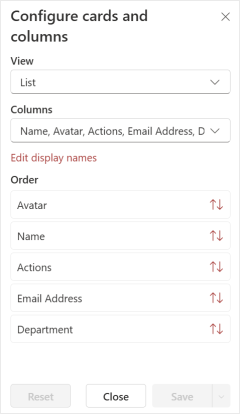
1. In the same panel, change the view to **List**.
2. Choose which attributes appear in the **columns**. You can edit the display names for attributes to business-friendly labels.
3. **Reorder** attributes to highlight the most relevant information.
4. Click Apply to preview or **Save** once complete.
****
---
### Configure actions
Actions let users interact with contacts directly from their cards, saving time.
**Steps to configure actions:**
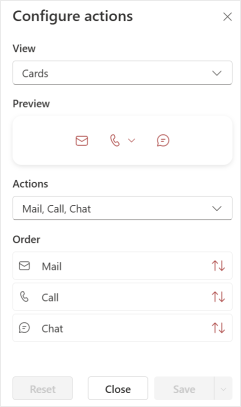
1. Open **Configure actions** in the property pane.
2. A panel will open. Here you can select the view to edit - either **Cards** or **List**.
3. Next, you will have the option to enable or disable the following actions:
- **Mail** - send an email directly from the card
- **Call** - start a call via Teams, business phone, or mobile
- **Chat** - launch a one-to-one Teams chat
4. **Reorder** actions to match your organization’s priorities.
5. Click Apply to preview or **Save** once complete.
---
### Manage placeholders
Apply custom placeholder messages to fine-tune the People Directory experience.
**Steps to manage placeholders:**
1. Open **Manage placeholders** in the property pane.
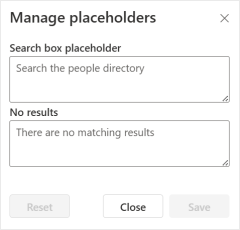
2. A panel will open, allowing you to edit text for:
- **Search box placeholder** - the text shown inside the search field
- **No results** - displayed when a search or filter returns no results.
3. Click **Save** once complete.
---
#### **➡️ Next - [Configuring search and quick filters](https://support.accelerator365.com/en/people-directory-search-and-filters?hsLang=en)**
#### ⬅️ Back - [Getting started](https://support.accelerator365.com/en/people-directory-getting-started?hsLang=en)
---
### Related articles
- [Frequently asked questions](https://support.accelerator365.com/en/people-directory-frequently-asked-questions?hsLang=en)
- [Use cases & best practices](https://support.accelerator365.com/en/people-directory-use-cases-best-practices?hsLang=en)
- [Release notes](https://support.accelerator365.com/en/people-directory-release-notes?hsLang=en)
- [Technical details](https://support.accelerator365.com/en/people-directory-technical-details?hsLang=en)
- [Getting started](https://support.accelerator365.com/en/getting-started?hsLang=en)
- [Apps](https://support.accelerator365.com/en/apps?hsLang=en#main-content)
- [Accordion](https://support.accelerator365.com/en/apps?hsLang=en#accordion)
- [Advent Calendar](https://support.accelerator365.com/en/apps?hsLang=en#advent-calendar)
- [Alerts](https://support.accelerator365.com/en/apps?hsLang=en#alerts)
- [Anniversaries](https://support.accelerator365.com/en/apps?hsLang=en#anniversaries)
- [Audience Subscription](https://support.accelerator365.com/en/apps?hsLang=en#audience-subscription)
- [Back to Top](https://support.accelerator365.com/en/apps?hsLang=en#back-to-top)
- [Before and After](https://support.accelerator365.com/en/apps?hsLang=en#before-and-after)
- [Carousel](https://support.accelerator365.com/en/apps?hsLang=en#carousel)
- [Countdown Calendar](https://support.accelerator365.com/en/apps?hsLang=en#countdown-calendar)
- [FAQ](https://support.accelerator365.com/en/apps?hsLang=en#faq)
- [Gauge](https://support.accelerator365.com/en/apps?hsLang=en#gauge)
- [Glossary](https://support.accelerator365.com/en/apps?hsLang=en#glossary)
- [Image Map](https://support.accelerator365.com/en/apps?hsLang=en#image-map)
- [Launchpad](https://support.accelerator365.com/en/apps?hsLang=en#launchpad)
- [My Calendar](https://support.accelerator365.com/en/apps?hsLang=en#my-calendar)
- [My Contacts](https://support.accelerator365.com/en/apps?hsLang=en#my-contacts)
- [My Emails](https://support.accelerator365.com/en/apps?hsLang=en#my-emails)
- [Noticeboard](https://support.accelerator365.com/en/apps?hsLang=en#noticeboard)
- [Page Authors](https://support.accelerator365.com/en/apps?hsLang=en#page-authors)
- [Page Breadcrumbs](https://support.accelerator365.com/en/apps?hsLang=en#page-breadcrumbs)
- [Page Feedback](https://support.accelerator365.com/en/apps?hsLang=en#page-feedback)
- [Page Tags](https://support.accelerator365.com/en/apps?hsLang=en#page-tags)
- [Page Tour](https://support.accelerator365.com/en/apps?hsLang=en#page-tour)
- [Pages Directory](https://support.accelerator365.com/en/apps?hsLang=en#pages-directory)
- [People Directory](https://support.accelerator365.com/en/apps?hsLang=en#people-directory)
- [Poll](https://support.accelerator365.com/en/apps?hsLang=en#poll)
- [Rate My Day](https://support.accelerator365.com/en/apps?hsLang=en#rate-my-day)
- [Section Search](https://support.accelerator365.com/en/apps?hsLang=en#section-search)
- [Site Analytics](https://support.accelerator365.com/en/apps?hsLang=en#site-analytics)
- [Spotlight](https://support.accelerator365.com/en/apps?hsLang=en#spotlight)
- [Stock Price](https://support.accelerator365.com/en/apps?hsLang=en#stock-price)
- [Subscribe Now](https://support.accelerator365.com/en/apps?hsLang=en#subscribe-now)
- [Table of Contents](https://support.accelerator365.com/en/apps?hsLang=en#table-of-contents)
- [Tabs](https://support.accelerator365.com/en/apps?hsLang=en#tabs)
- [User Profile](https://support.accelerator365.com/en/apps?hsLang=en#user-profile)
- [Welcome](https://support.accelerator365.com/en/apps?hsLang=en#welcome)
- [Solutions](https://support.accelerator365.com/en/solutions?hsLang=en#main-content)
- [Content Manager Dashboard](https://support.accelerator365.com/en/solutions?hsLang=en#content-manager-dashboard)
- [Translator for SharePoint](https://support.accelerator365.com/en/solutions?hsLang=en#translator-for-sharepoint)
- [Look Book](https://support.accelerator365.com/en/look-book?hsLang=en)
- [Pricing](https://support.accelerator365.com/en/pricing?hsLang=en)
- [Technical](https://support.accelerator365.com/en/technical?hsLang=en#main-content)
- [General](https://support.accelerator365.com/en/technical?hsLang=en#general)
- [Maintenance](https://support.accelerator365.com/en/technical?hsLang=en#maintenance)
- [Troubleshooting](https://support.accelerator365.com/en/technical?hsLang=en#troubleshooting)
- [About](https://accelerator365.com/pages/about-us)
- [Blogs](https://accelerator365.com/blogs/updates)
- [Reply](https://www.reply.com/en)
- [Partners](https://accelerator365.com/pages/find-a-partner)
- [Contact](https://accelerator365.com/pages/contact)
- [License Agreement](https://accelerator365.com/pages/license-agreement)
- [Privacy Policy](https://www.reply.com/en/privacy-policy)
- [Service Level Agreement](https://accelerator365.com/pages/service-level-agreement)
[.png?width=60&height=29&name=Accelerator%20365%20Logo%20(Colour%20+%20No%20Text).png "Accelerator 365 logo")](https://accelerator365.com/)
Accelerator 365 by Reply