.png?width=100&height=47&name=Accelerator%20365%20Logo%20(Colour%20+%20No%20Text).png)
The My Calendar app gives you a quick, glanceable view of your upcoming Outlook events directly in your Viva Connections dashboard. It helps users stay on top of their day and see what’s coming up next in their calendar.
Jump to
Configuring the app for the first time
Note: My Calendar is only supported in the Viva Connections Dashboard. Ensure Viva Connections is configured and your dashboard created (learn more here).
To add the My Calendar app:
- Edit your Viva Connections Dashboard page.
- Add the My Calendar card.
-
Once added, the card will automatically display your upcoming events from Outlook.
Adjusting the card settings
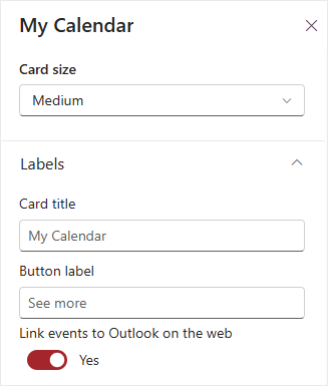
The My Calendar card is highly configurable to suit your workflow:
-
Card size: Choose either Medium or Large.
-
Card title: Customize the title displayed at the top of the card.
-
Button label: Change the text of the button that opens Outlook.
-
Link events to Outlook on the web: Decide whether individual events presented in the quick view open in Outlook on the web.